
ApexGaming Valid Turnover Troubleshooting: Common Fixes
Checked your Outstanding page and the number didn’t match what you expected? You’re not alone — most turnover confusion comes down to a handful of repeatable causes, not a broken account. This guide walks through ApexGaming valid turnover troubleshooting for the issues players run into most, and what to check before you contact support.

Quick Refresher: Valid Turnover vs. Withdrawal Turnover
Two numbers, easy to mix up:
Withdrawal Turnover
Withdrawal Turnover is your target — set when you deposit, and higher if you claimed a bonus on that deposit.
Valid Turnover
Valid Turnover is your progress — how much you’ve actually wagered, updated as you play.
You can withdraw once Valid Turnover meets or passes your Withdrawal Turnover. Most “why can’t I withdraw” questions trace back to one of these two numbers being misread.
Where to Check It
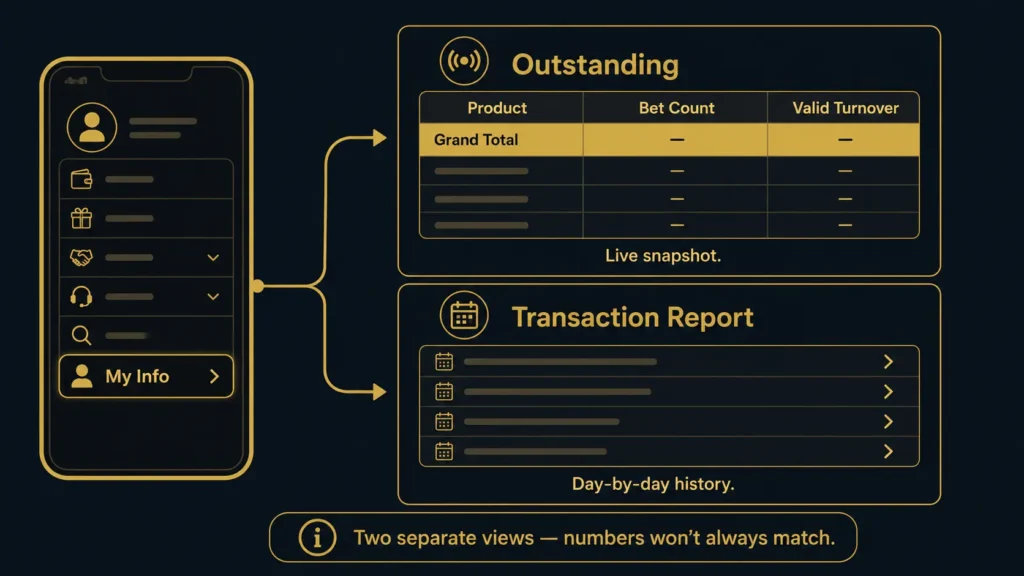
Go to My Info → Outstanding for your live turnover snapshot, broken down by Product, Bet Count, and Valid Turnover, with a Grand Total row at the top. For a day-by-day history instead, check My Info → Transaction Report. Keep in mind these are two separate views built for different purposes — a live snapshot versus a daily log — so don’t expect them to always read as identical figures for the same session.
Common Turnover Problems and How to Fix Them
1. Outstanding Shows "No Data Found"
This isn’t an error. It means no bets were placed within the date range you searched. Switch to View All or widen your Date From / Date To range before assuming something’s wrong.
2. The Grand Total Looks Lower Than Expected
Check your date filter first — if it’s set to Today but you’re trying to review turnover from earlier in the week, the total will only reflect today’s activity. Reset to View All and search again to see your full picture.
3. Outstanding and Transaction Report Don't Match
These two sections serve different purposes: Outstanding gives you a real-time snapshot of what’s currently outstanding against your active requirement, while Transaction Report gives you a historical, day-by-day breakdown. Comparing a live number against a daily log can make them look inconsistent even when both are accurate for what they’re measuring. If you need one number to plan a withdrawal, use Outstanding — that’s the one tied to your requirement.
4. Turnover Isn't Moving After You Place Bets
Give it a moment — updates aren’t always instant, especially right after a bet settles. If it still hasn’t updated after a few minutes, refresh the page or log out and back in before assuming the bet didn’t count.
5. Confusion With Multiple Active Bonuses
If you have more than one bonus running at once, each deposit has its own Withdrawal Turnover target based on that deposit’s amount and bonus terms. Your Valid Turnover in Outstanding applies to whichever requirement is currently active. If you can’t tell which target governs your balance, that’s a support question, not a math problem you need to solve alone.
6. Numbers Look Different Between Desktop and Mobile
If you checked on desktop earlier and the number looks different when you check again on your phone, it’s usually a caching issue rather than two separate totals. Refresh the page or fully reload the Outstanding section on whichever device shows the older number. If you’re logged into more than one browser tab or device at the same time, close the extras and check from a single session to avoid comparing a stale page against a live one.
7. A Product Category You Don't Remember Playing Shows Up
If the breakdown lists a game category you’re sure you didn’t touch, double-check that you’re reviewing the right date range and not a leftover session from a previous login on a shared device. If the entry still doesn’t match your memory of that session, that’s worth a support message rather than guesswork — they can confirm exactly what was recorded against your account.
When to Contact Support Instead of Troubleshooting Further
Reach out if:
- Your Outstanding total hasn’t changed after several completed bets and a page refresh
- You’ve confirmed your date filters are correct and the number still looks wrong
- You’re unsure which bonus’s turnover requirement applies to your current balance
Support can pull your account records directly rather than you guessing from what’s shown on screen.
Frequently Asked Questions
Why does my Outstanding page show "no data found" even though I played today?
Check your date filter. If it’s set to a specific past range, switch to Today or View All to see current activity.
Is it normal for turnover to take a few minutes to update?
Small delays can happen right after a bet settles. If it’s still not reflected after several minutes, refresh the page before contacting support.
Why do Outstanding and Transaction Report show different numbers?
They’re not meant to match exactly — Outstanding is a live snapshot tied to your current requirement, while Transaction Report is a daily history log. Use Outstanding when you’re checking if you can withdraw.
I have two bonuses active. Which turnover number applies to my withdrawal?
Each deposit has its own Withdrawal Turnover target. If you’re unsure which one governs your current balance, contact support before submitting a withdrawal request.
My turnover looks wrong no matter what I check. What now?
Message support with your account details. They can review your actual records instead of relying on what’s displayed.
Why does my Outstanding total look different on my phone than it did on my computer?
This is almost always a caching issue. Refresh the page, or fully close and reopen the browser tab, on whichever device shows the outdated number.
Can leftover sessions on a shared device cause turnover confusion?
Yes. If someone else used the same device and browser without logging out, you might see activity that isn’t yours. Always log out fully on shared or public devices.
Responsible Gaming
ApexGaming is currently under PAGCOR monitoring. All players must be 21 years old or above to access the platform.
If tracking your turnover is making you feel pressured to bet more than planned just to “fix” a number, that’s a sign to stop and take a break. Set a budget before you play and stick to it.
For responsible gaming support, contact PAGCOR at ResponsibleGaming@pagcor.ph.
Contact Support
- Telegram: https://t.me/+WEXiKdES01k0YmM1
- Facebook Messenger: https://www.facebook.com/ApexGamingPH88Official
- Email: apexgamingphilippines@gmail.com