
ApexGaming999 Login Troubleshooting Guide
Logging in should take seconds. When it doesn’t, most players hit the same handful of problems — a mistyped username, a browser holding old data, or a network that blocks the site outright. This guide covers ApexGaming999 login troubleshooting the short way: a quick walkthrough first, then the fixes for when something breaks.
Quick Login Steps
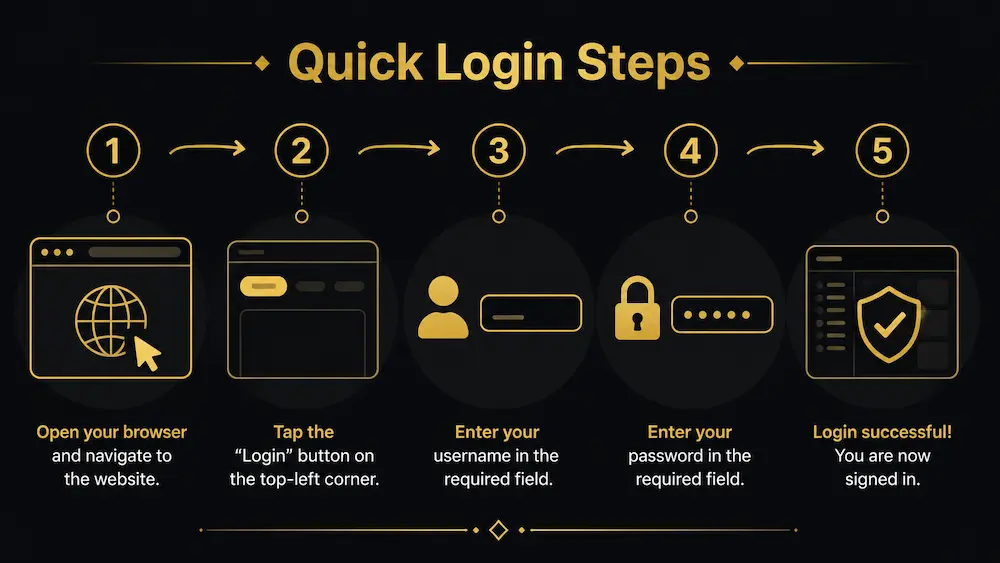
- Open your browser (Chrome, Safari, or Edge all work) and go to apexgaming999.com.
- Tap the Login button in the top-left corner or the mobile menu.
- Enter your username exactly as registered. Login is username-based, not email, and it’s case-sensitive.
- Enter your password, then tap Login again.
- You’ll land on your dashboard once the system confirms your details.
That’s the full process on a good connection. Most ApexGaming999 account access problems come from one of the steps above, not from ApexGaming88 itself — which is why the troubleshooting section below matters more than the steps.
Logging In on Mobile
ApexGaming999 doesn’t have an app in the Play Store or App Store, and that’s by design, not a gap. Save the site to your home screen instead: open apexgaming999.com in Safari (iOS) or Chrome (Android), then use “Add to Home Screen.” It behaves like an app — no install, no storage used, and it updates automatically since it’s just loading the live site.
Login Troubleshooting: Common Problems and Fixes
"Invalid username or password"
Clear your browser cache and cookies, then reload. If the site loads on mobile data but not Wi-Fi (or the other way around), the problem is usually the network, not your account — try switching connections before assuming something’s wrong on Apex88’s end.
Page won't load or times out
Clear your browser cache and cookies, then reload. If the site loads on mobile data but not Wi-Fi (or the other way around), the problem is usually the network, not your account — try switching connections before assuming something’s wrong on Apex88’s end.
Site appears blocked or restricted on your network
Some ISPs and workplace or campus networks restrict access to gaming platforms. If apexgaming999.com won’t load at all — not even the homepage — connect through a VPN set to a Philippines or Singapore server, then try again.
Login works but the page keeps refreshing or freezing
Don’t tap Login repeatedly. Each tap resends the request and can cause a refresh loop. Wait a few seconds after your first attempt before trying again.
Slow response during peak hours
Traffic spikes around lunch break and evening hours can slow down page loads across ApexGaming88, not just for login. If everything feels sluggish around those times, it’s usually temporary congestion rather than an account issue.
Locked out or access restricted
This is almost always a caching issue. Refresh the page, or fully close and reopen the browser tab, on whichever device shows the outdated number.
Make Sure You're on the Right Site
Clone and lookalike sites are common in Philippine online gaming — pages that copy the layout and branding but lead to a different platform entirely. Before troubleshooting anything else, check the address bar reads apexgaming999.com exactly. If a bookmark or saved link redirects somewhere else, or the page layout looks slightly off, don’t enter your credentials. Type the address in fresh instead.
Why Mobile Logins Fail More Often
Most login complaints Apex88 sees come from mobile, not desktop, and it’s rarely the platform. Prepaid data plans are common in the Philippines, and once a plan hits its speed cap or runs low, pages load halfway — the login form appears, but the page can’t finish confirming your session. It looks like a broken login. It’s usually a throttled connection. Switching to Wi-Fi, or topping up data, fixes it faster than retrying the login form.
Browser choice matters too. Older phones running outdated versions of Chrome or the default Android browser sometimes fail to load the login form correctly. If the page looks broken or buttons don’t respond, update your browser app first before assuming your account has an issue.
Login Troubleshooting FAQ
Can I use the same account on my phone and computer?
Yes. One account works across devices — you don’t need to register separately for mobile.
Why does my session log out on its own?
Sessions can time out after periods of inactivity, or if you switch networks mid-session (for example, moving from Wi-Fi to mobile data). Log in again once you’re back on a stable connection.
Is there a limit to how many times I can try logging in?
There’s no fixed attempt limit, but repeated failed logins in a short window can temporarily flag the account. Wait a minute or two between attempts if your first few tries fail, rather than retrying immediately.
Do I need to verify my account before I can log in?
No. Verification is only required if your account gets locked, has a withdrawal restriction, or is flagged for a violation. A normal login doesn’t ask for it.
Forgot Your Password?
If your password is the issue, don’t keep guessing. Use the Forgot Password link on the login page to reset it through your registered contact details.
Still Can't Log In?
If none of the fixes above work, reach out directly:
- Telegram: https://t.me/+WEXiKdES01k0YmM1
- Facebook Messenger: https://www.facebook.com/ApexGamingPH88Official
- Email: apexgamingphilippines@gmail.com
- On-site Live Chat
Have your username and a short description of the issue ready — it speeds up the response. Mention what you’ve already tried (browser restart, VPN, different network) so support isn’t asking you to repeat steps you’ve already ruled out.
Responsible Gaming
ApexGaming88 is currently under PAGCOR monitoring. Play within your means and take breaks when needed. If gaming starts to feel like a problem rather than a pastime, reach out to PAGCOR at ResponsibleGaming@pagcor.ph for support.